Week 1 Java: Setting Up the Infrastructure
1. Introduction
Task scheduling is one of those “boring” infrastructure concerns that quietly determines whether a backend behaves like a system or like a pile of endpoints. Real services don’t only react to inbound HTTP. They poll upstream systems, rotate files, refresh caches, emit periodic heartbeats, and enforce time-based policies. When those time-based behaviors are unreliable, everything else degrades: logs pile up, caches go stale, disk fills, and operators lose observability exactly when they need it most.
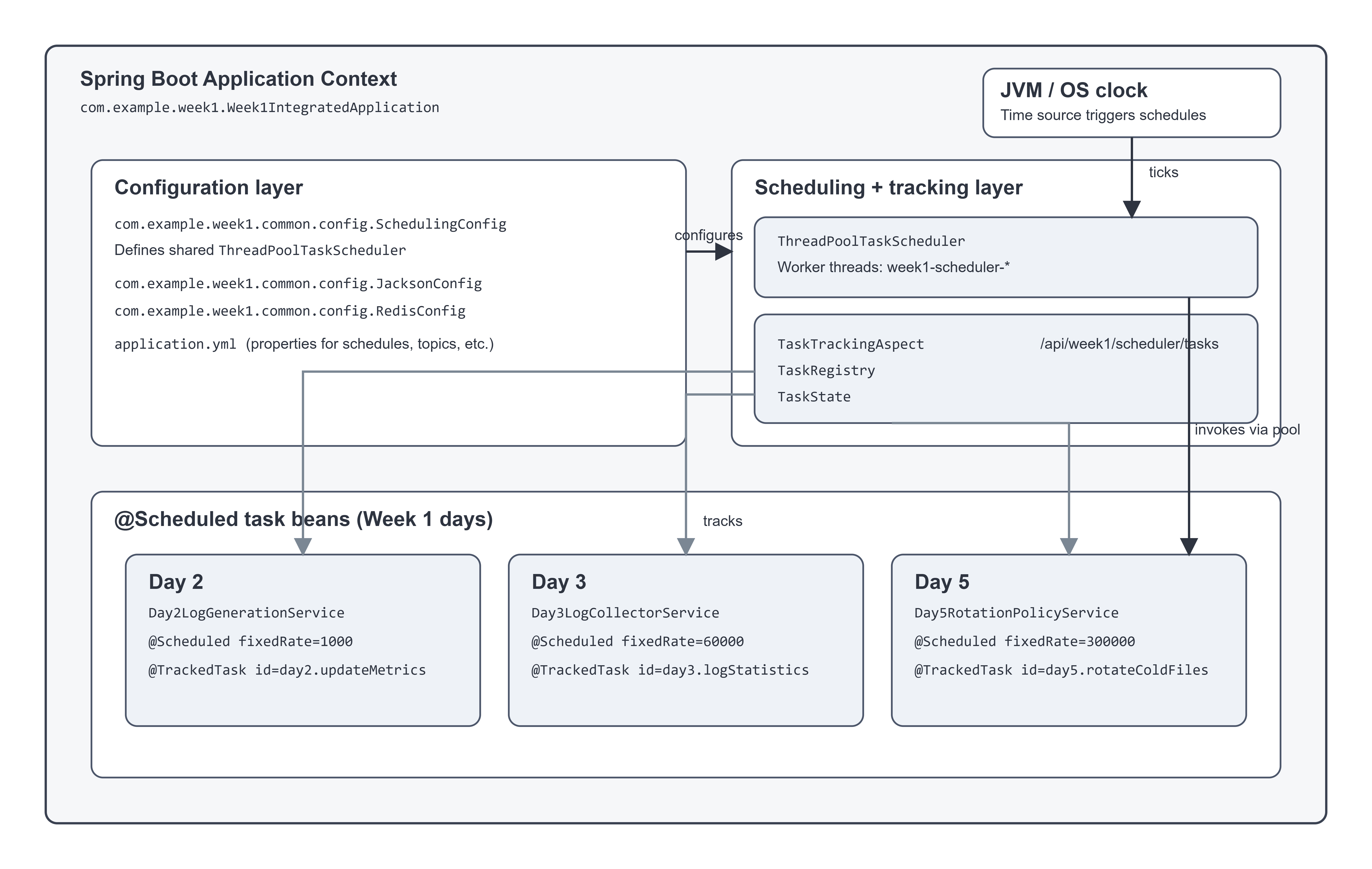
This integrated Week 1 project demonstrates scheduling as a concrete, inspectable part of a local log processing pipeline. It starts with simple time-driven behaviors (generation rate accounting and periodic stats), then connects them to more “operational” concerns like log parsing and file rotation. In code terms, this system is intentionally small, but it uses the same primitives you’d use in production Spring services: @Scheduled methods, a shared scheduler (ThreadPoolTaskScheduler), and a lightweight registry that tracks task state across runs.
This is written for a mid-level engineer who already knows Spring Boot basics and wants to treat scheduling as a first-class engineering concern. You’ll learn how scheduling interacts with thread pools and failure handling, how to keep periodic jobs observable, and how to integrate scheduled work into a pipeline without turning it into a ball of side effects.
2. From Fundamentals to a Unified System
Day 1 — Environment + a stable place to “run the system”
Day 1 is about getting a repeatable development environment and repository structure so infrastructure can actually be exercised. In this integrated app, that shows up as the ability to run “the system” with one entry point (com.example.week1.Week1IntegratedApplication) and a predictable set of endpoints (see com.example.week1.common.web.HomeController and SystemOverviewController). The engineering concern is reproducibility: scheduled systems are hard to debug when you can’t reliably start, stop, and observe them.
Day 2 — Configurable log generator and time-driven behavior
Day 2 introduces a log generator that can produce sample events at a configurable rate. In the integrated project, the generator runs in com.example.week1.day2.service.Day2LogGenerationService, which uses an internal thread pool for generation and a scheduled method for per-second rate calculations:
Day2LogGenerationService.updateMetrics() is @Scheduled(fixedRate = 1000) and also annotated with @TrackedTask(id = "day2.updateMetrics", ...).
This maps directly to a common production pattern: time-window metrics (or control loops) that run regardless of inbound traffic. You can expose a generator as an HTTP API, but its behavior is only correct if the periodic bookkeeping is correct and thread-safe.
Day 3 — File-based collector and periodic reporting
Day 3 adds a log collector that reads local files, maintains offsets, and de-duplicates entries. In the integrated app, com.example.week1.day3.service.Day3LogCollectorService watches directories and periodically emits statistics:
Day3LogCollectorService.logStatistics() is @Scheduled(fixedRate = 60000) and @TrackedTask(id = "day3.logStatistics", ...).
The engineering concern here is “background work as a pipeline.” Watching a filesystem isn’t request/response; it’s event-driven plus periodic health/reporting. When you’re building infrastructure, the first step toward reliability is making the background work visible.
Day 4 — Parsing as a service, not a regex in the hot path
Day 4 implements parsing to extract structured data from common log formats. In the integrated project, parsing lives in com.example.week1.day4.service.Day4LogParsingService, and the raw-to-structured transformation is represented by com.example.week1.day4.service.Day4RawLogProcessor.
The scheduling tie-in is subtle but real: parsing is often invoked by scheduled or asynchronous pipelines (batching, periodic scans, backfills). Even when parsing is triggered by file changes or Kafka, the system still needs predictable timing around reporting and policy enforcement.
Day 5 — Storage, rotation policies, and operational “tick” jobs
Day 5 introduces a storage mechanism using flat files with rotation. In the integrated project, rotation is a scheduled policy evaluation:
com.example.week1.day5.service.Day5RotationPolicyService.evaluateRotationPolicies() runs on @Scheduled(fixedRate = 300000) and is annotated with @TrackedTask(id = "day5.rotateColdFiles", ...).
This is exactly what a backend does in production: continuously enforce time/size policies. It’s not “feature code,” but it’s the code that prevents outages. Rotation jobs need predictable scheduling, bounded runtime, and strong observability when they fail.
Day 6 — Querying and filtering as an operational interface
Day 6 adds query APIs that filter stored logs with cache behavior and circuit breakers (com.example.week1.day6.service.Day6LogQueryService). This day is about operator ergonomics: scheduled pipelines need query surfaces so you can validate that the system is behaving over time, not just at a single moment.
The engineering concern is feedback loops. Scheduled systems are prone to silent failure. Query endpoints (plus metrics) are how you close the loop.
Day 7 — Integration into a local pipeline
Day 7 is the integration day: connect generation, collection, parsing, and storage into a pipeline that can run locally. In this integrated project, the pipeline is mediated via a dispatch layer (com.example.week1.common.kafka.LogEventDispatchService) that can either publish to Kafka (when enabled) or persist directly (when Kafka is disabled).
The scheduling concern is orchestration without tight coupling. The system can run local-only and still exercise scheduled tasks like metrics rollups and rotation. When Kafka is enabled, the same scheduled tasks still work; they just become part of a larger asynchronous pipeline.
3. Architecture Overview