

Day 4: Log Parsing - Extracting Structure from Chaos
Week 1: Setting Up the Infrastructure
Welcome to Day 4 of our 254-Day journey into distributed systems! Today, we're diving into log parsing - a critical skill that transforms raw, chaotic logs into structured, actionable data. This is where the real magic begins in our distributed log processing system.
What is Log Parsing and Why Does it Matter?
Imagine you're a detective trying to solve a mystery, but instead of organized case files, you're handed thousands of random notes scribbled in different formats. That's what raw logs are like! Log parsing is like hiring an assistant who organizes those notes into clear categories - who did what, when, and how.
In distributed systems, parsing logs is essential because:
It transforms unstructured text into structured data we can analyze
It normalizes different log formats into a consistent schema
It enables filtering, searching, and aggregating log data
It prepares data for storage in databases or data lakes
Where Log Parsing Fits in Distributed Systems
Log Parsing in Distributed System Architecture

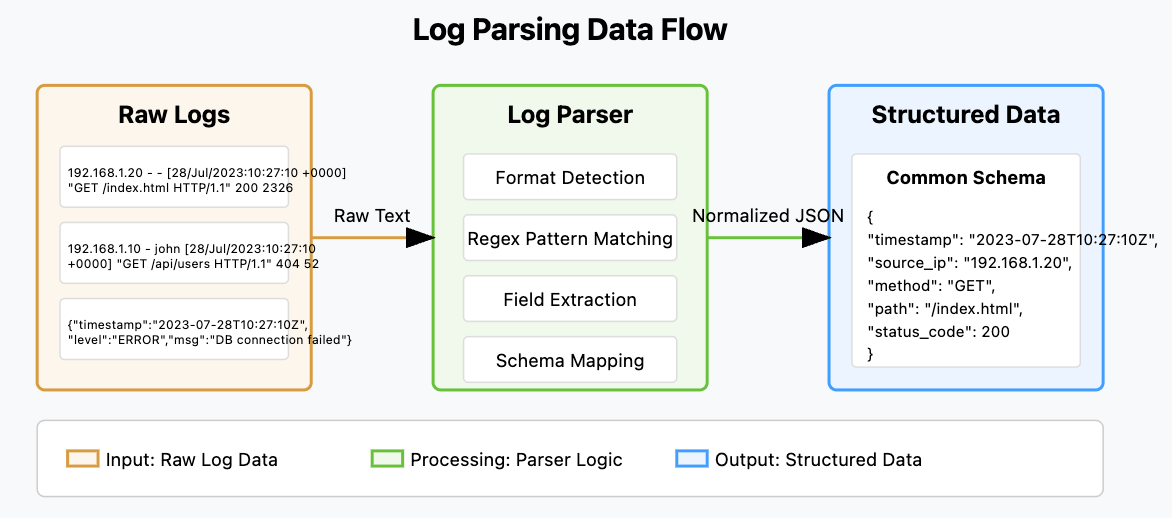
In a distributed system, log parsing bridges the gap between raw data collection and meaningful insights. As shown in the architecture diagram, it sits between the Log Collector (which you built yesterday) and downstream components like analytics, alerting, and storage systems.
The parser transforms messy, unstructured logs into clean, structured data that can be:
Stored efficiently in databases
Queried and analyzed quickly
Used for real-time alerting and monitoring
Visualized in dashboards
Processed by machine learning algorithms
The Log Parsing Challenge
Log formats vary widely across systems. Just look at these examples:
Apache Access Log:
192.168.1.20 - - [28/Jul/2023:10:27:10 +0000] "GET /index.html HTTP/1.1" 200 2326Nginx Access Log:
192.168.1.10 - john [28/Jul/2023:10:27:10 +0000] "GET /api/users HTTP/1.1" 404 52 "https://example.com" "Mozilla/5.0"JSON Log:
{"timestamp": "2023-07-28T10:27:10Z", "level": "ERROR", "message": "Database connection failed", "service": "user-api"}Our parser needs to handle this diversity and turn it into consistent, structured data.
Log Parsing Data Flow
Let's Build a Log Parser
Now let's get our hands dirty by building a log parser that can handle common log formats. We'll use Python with regular expressions to extract structured data.
Source code repository: https://github.com/sysdr/course/tree/main/day4
Step 1: Create a Basic Parser Class
Let's start with a simple parser framework:
Log Parser Implementation

Step 2: Create a Script to Test Our Parser
Now let's create a script to test our parser with some sample logs:
Log Parser Demo Script. - log_parser_demo.py

Step 3: Create a Containerized Version
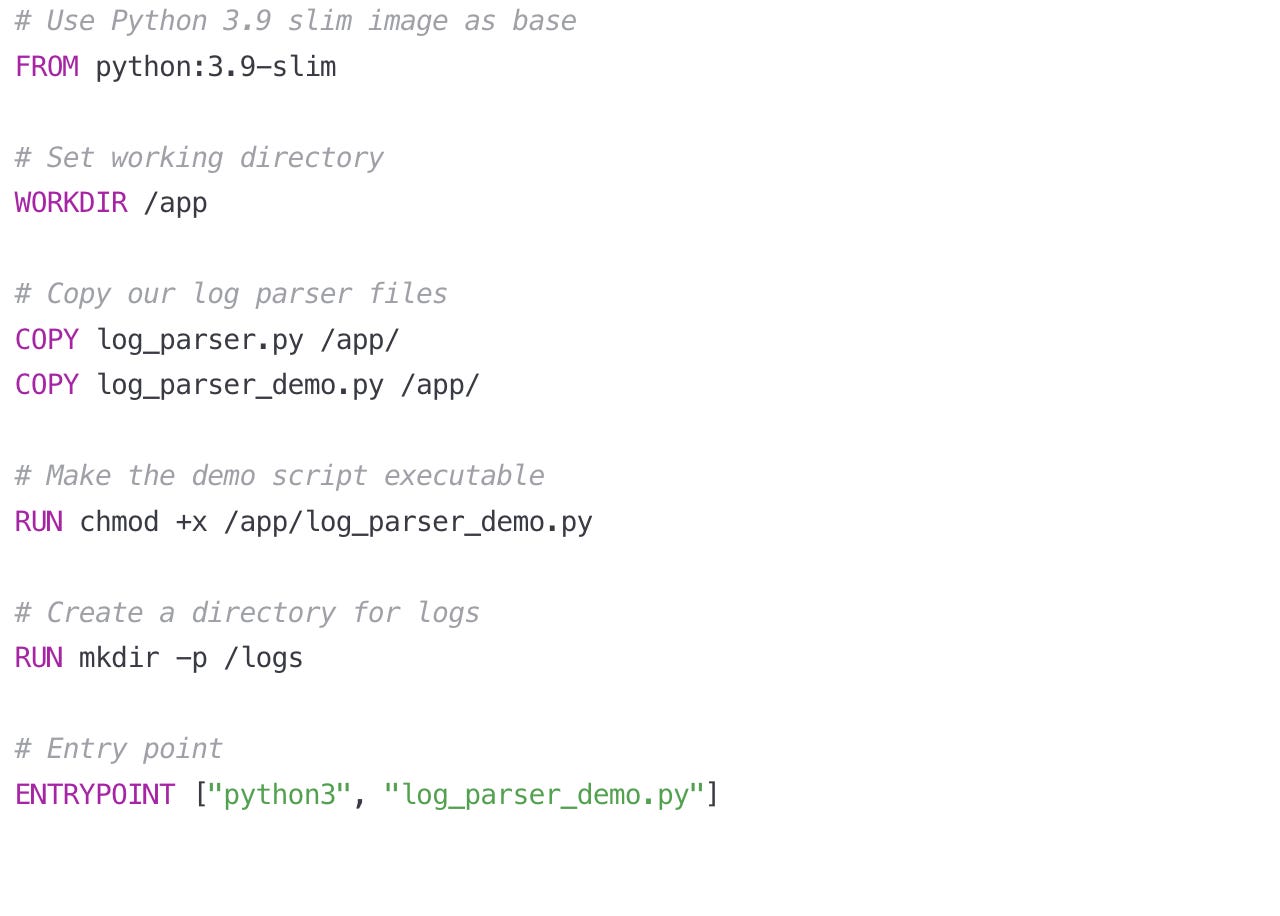
Let's put our log parser in a Docker container so it can be easily deployed and integrated with other components.
Dockerfile for Log Parser. : Dockerfile
Step 4: Create a Real Application Parser
Now, let's build a more practical application that integrates with our Log Collector from Day 3:
Log Processing Service. : log_processing_service.py

Now let's create a more complete Dockerfile for our log processing service:
Dockerfile for Log Processing Service. : Dockerfile
Setup.sh : run this file to create all source files and relevant sample logs
Building, Testing, and Verifying the Log Parser
Let me walk you through the steps to build, test, and verify the log parser code from the article, both with and without Docker.
Building and Testing Without Docker
Step 1: Set Up the Environment
First, let's create all the necessary files and directories based on the code snippets in the article:
Create a project directory to organize your work:
mkdir log-parser-project
cd log-parser-project
Create directories for input logs and parsed output:
mkdir logs
mkdir parsed_logs
Step 2: Create the Core Files
The article mentions three primary Python files that need to be created:
Create
log_parser.pyfile with the LogParser class (the article only shows part of this code, so you'll need to complete it)
touch log_parser.pyCreate the demo script to test basic functionality:
touch log_parser_demo.pyCreate the more complete log processing service:
touch log_processing_service.pyStep 3: Install Required Dependencies
The log processing service uses the watchdog library to monitor files:
pip install watchdogStep 4: Make the Scripts Executable
Make the Python scripts executable so they can be run directly:
chmod +x log_parser_demo.py
chmod +x log_processing_service.py
Step 5: Create Test Log Files
Create sample log files for testing the parser:
cat > logs/sample.log << EOL
192.168.1.20 - - [28/Jul/2023:10:27:10 +0000] "GET /index.html HTTP/1.1" 200 2326
192.168.1.10 - john [28/Jul/2023:10:27:10 +0000] "GET /api/users HTTP/1.1" 404 52 "https://example.com" "Mozilla/5.0"
{"timestamp": "2023-07-28T10:27:10Z", "level": "ERROR", "message": "Database connection failed", "service": "user-api"}
EOL
Step 6: Run the Demo Script
Test the basic functionality of the parser:
./log_parser_demo.pyThis should display the parsed results for each of the sample log lines, showing how the parser transforms them into structured data.
Step 7: Run the Processing Service
Start the log processing service to monitor and process files:
./log_processing_service.pyThis will continuously watch the logs directory and process any new or modified log files.
Step 8: Test with Real-Time Log Updates
While the service is running, add a new log line to test the processing:
echo '192.168.1.30 - - [28/Jul/2023:11:27:10 +0000] "GET /contact.html HTTP/1.1" 200 1234' >> logs/sample.logStep 9: Verify Results
Check the parsed output files to confirm the service is working:
cat parsed_logs/parsed_sample.log.json
cat parsed_logs/parsing_stats.json
Building and Testing With Docker
Step 1: Create a Dockerfile
Create a Dockerfile based on the one provided in the article:
cat > Dockerfile << EOL
# Use Python 3.9 slim image as base
FROM python:3.9-slim

# Set working directory
WORKDIR /app

# Copy our log parser files
COPY log_parser.py /app/
COPY log_parser_demo.py /app/
COPY log_processing_service.py /app/

# Install required packages
RUN pip install watchdog

# Make the scripts executable
RUN chmod +x /app/log_parser_demo.py
RUN chmod +x /app/log_processing_service.py

# Create directories for logs
RUN mkdir -p /app/logs /app/parsed_logs

# Set environment variables
ENV LOG_INPUT_DIR=/app/logs
ENV LOG_OUTPUT_DIR=/app/parsed_logs

# Command to run (can be overridden)
CMD ["python", "/app/log_processing_service.py"]
EOL
Step 2: Build the Docker Image
Build the Docker image using the Dockerfile:
docker build -t log-parser:latest .Step 3: Run the Demo Script in Docker
Test the parser's functionality in the Docker container:
docker run --rm log-parser:latest python /app/log_parser_demo.pyStep 4: Run the Processing Service in Docker
Start a container that runs the log processing service, mapping volumes to share files between the host and container:
docker run -d --name log-parser-service \
  -v $(pwd)/logs:/app/logs \
  -v $(pwd)/parsed_logs:/app/parsed_logs \
  log-parser:latest
Step 5: Test the Service in Docker
Add a new log entry to test processing in the Docker container:
echo '192.168.1.40 - - [28/Jul/2023:12:27:10 +0000] "GET /products.html HTTP/1.1" 200 5678' >> logs/sample.logStep 6: Verify Docker Processing
Check the container logs to verify processing:
docker logs log-parser-serviceCheck the output files to confirm parsing:
cat parsed_logs/parsed_sample.log.json
cat parsed_logs/parsing_stats.json
Integration with Log Collector from Day 3
The article mentioned connecting the parser to the Day 3 log collector. To complete this integration:
Make sure you have the log collector component from Day 3
Configure the log collector to output logs to a directory monitored by the log processing service
Configure the log processing service to watch that directory
For example, if your Day 3 log collector writes to /var/log/collector/:
LOG_INPUT_DIR=/var/log/collector/ ./log_processing_service.pyOr with Docker:
docker run -d --name log-parser-service \
  -v /var/log/collector:/app/logs \
  -v $(pwd)/parsed_logs:/app/parsed_logs \
  log-parser:latest
Comprehensive Verification
To thoroughly verify your log parser implementation:
Test with multiple log formats (Apache, Nginx, JSON)
Test with malformed logs to ensure error handling
Verify statistical metrics are being collected
Test high-volume log processing to ensure performance
You can create a verification script that checks:
The number of successfully parsed logs
The number of failed parses
The distribution of status codes
The distribution of source IPs
The validity of the output JSON structure
Real-World Applications of Log Parsing
Understanding log parsing isn't just about technical implementation - it's about seeing how it enables powerful capabilities in real-world systems:
Netflix uses log parsing to analyze user behavior and content performance across millions of streaming sessions
Amazon parses logs from thousands of microservices to identify and fix issues before they affect customers
Google processes trillions of log entries daily to detect security threats and optimize search performance
Financial institutions use log parsing to detect fraudulent transactions by analyzing patterns in user activity logs
How Log Parsing Scales in Distributed Systems
In a small application, a single parser instance might handle all logs. But as your system grows:
Horizontal Scaling: Deploy multiple parser instances behind a load balancer
Stream Processing: Use Kafka or similar tools to distribute log processing
Specialized Parsers: Create dedicated parsers for different log formats
Schema Evolution: Design your parser to handle changes in log formats over time
Today's Assignment: Build Your Own Enhanced Log Parser
Now it's your turn to build on what we've learned! Your assignment is to extend our log parser with new capabilities.
Requirements:
Add support for at least one additional log format (Windows Event Logs, Syslog, etc.)
Implement error handling for malformed logs
Create statistical metrics about your parsed logs (counts by status code, source IP, etc.)
Connect your parser to the log collector you built on Day 3
Write the parsed logs to a structured format (CSV, JSON, SQLite)
Steps to Complete:
Setup: Create a new Python file called
enhanced_log_parser.pythat extends our baseLogParserclassFormat Support: Research the format specification for your chosen log type and implement a parser method
Error Handling: Add a robust error handling mechanism that logs parsing errors without crashing
Statistics: Create a simple in-memory statistics collector that tracks counts of various fields
Integration: Connect your parser to read from the output of your Day 3 log collector
Output: Write the parsed logs and statistics to files for later analysis
Testing: Create sample logs of various formats to verify your parser works correctly
Containerization: Update the Dockerfile to include your enhanced parser
Extra Credit:
Implement a simple web UI that displays your log parsing statistics
Add support for custom log formats defined by regular expressions
Create a mechanism to detect and handle log format changes automatically
Wrapping Up
Today you've learned how to transform raw, chaotic logs into structured, actionable data. This is a critical component in any distributed system, enabling monitoring, debugging, analytics, and security features.
Remember that log parsing sits at the heart of observability in distributed systems. As you progress through this course, you'll build on today's parser to create increasingly powerful log analysis capabilities.
In our next lesson, we'll explore how to store and index these parsed logs efficiently to enable fast searching and querying, which will complete the foundation of our log processing pipeline.
Happy coding!