

Day 151: Building Your GitOps Deployment Pipeline - Infrastructure as Code in Action
What We’re Building Today
Picture Netflix deploying new features thousands of times per day across their global infrastructure. How do they ensure every deployment is trackable, reversible, and consistent? The answer is GitOps - treating your Git repository as the single source of truth for infrastructure and application configurations.
Today you’ll build a complete GitOps workflow that automatically deploys your distributed log processing platform whenever configuration changes are committed to Git. By lesson’s end, you’ll have a system that deploys, monitors, and self-heals deployments across multiple environments.
Today’s Learning Objectives:
Implement Git-based deployment automation
Build reconciliation loop for continuous sync
Create deployment validation and rollback mechanisms
Integrate with Day 150’s cloud infrastructure templates
Deploy web dashboard showing real-time deployment status
Why GitOps Revolutionizes Deployments
Traditional deployments involve running scripts manually or triggering pipelines that push changes. GitOps flips this model - your cluster continuously watches Git and pulls changes automatically. Think of it like having a vigilant assistant who constantly checks your to-do list and executes tasks the moment they appear.
Weaveworks (GitOps creators) manages over 1,000 microservices using this pattern. When they push a config change, deployments happen across all environments within 30 seconds, with complete audit trails showing who changed what and when.
Core GitOps Principles
Git as Single Source of Truth
Every configuration lives in Git - Kubernetes manifests, Terraform files, application configs. Want to know what’s running in production? Check the main branch. Need to rollback? Revert a commit. This simple principle eliminates configuration drift and “works on my machine” problems.
Declarative Configuration
You declare what you want (3 replicas of log-processor with 2GB memory), not how to get there. The system figures out the steps needed to reach that state, whether it means scaling up, updating images, or recreating pods.
Automated Synchronization
A reconciliation agent (like FluxCD or ArgoCD) continuously compares Git state with cluster state. Any drift triggers automatic healing - if someone manually changes a deployment, the system reverts it back to Git’s definition within seconds.
Observable Deployments
GitOps provides built-in observability. Every deployment has a Git commit showing exactly what changed, who approved it, and when it deployed. Failed deployments automatically rollback based on health checks.
Architecture Deep Dive
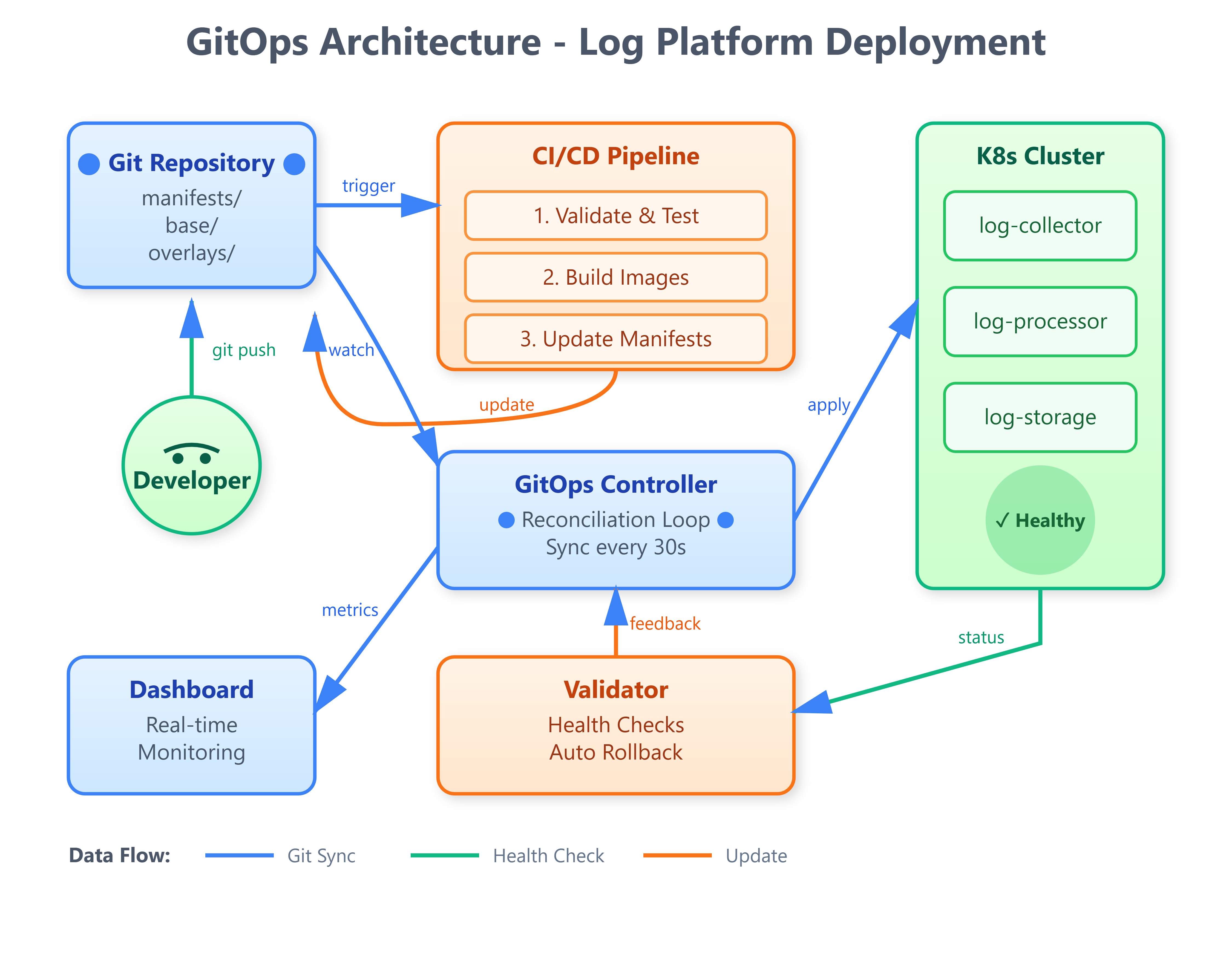
Our GitOps system consists of four interconnected components:
Git Repository Layer stores all deployment manifests, Helm charts, and configuration files organized by environment (dev/staging/prod). Each environment has dedicated branches or directories ensuring clean separation.
CI/CD Pipeline triggers on Git commits, runs validation tests, builds container images, updates manifests with new image tags, and creates deployment pull requests for review.
Reconciliation Service watches Git repository continuously (polling every 30 seconds), compares desired state (Git) with actual state (cluster), and applies changes to eliminate drift. Uses leader election for high availability.
Deployment Validator monitors newly deployed resources, runs health checks and integration tests, automatically rolls back on failures, and publishes deployment events to monitoring systems.
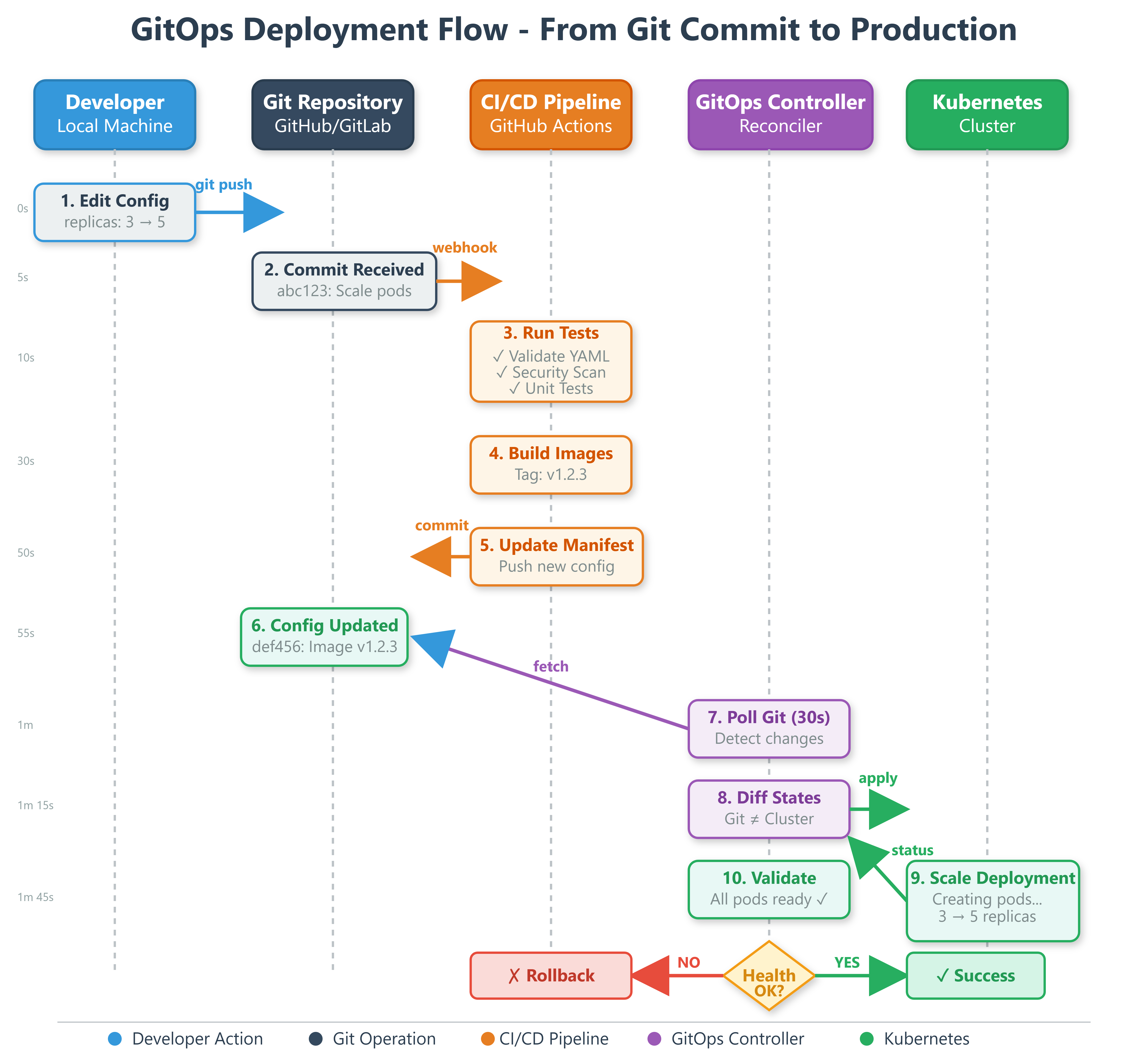
The data flow follows a clean cycle: Developer commits → CI validates → Manifests update → Reconciler detects → Cluster applies → Validator verifies → Status updates to Git (via annotations).
Real-World GitOps Patterns
Multi-Environment Strategy
GitHub manages dev/staging/production with separate Git directories. Changes flow through environments progressively - commit to dev, observe behavior, promote to staging for integration tests, then production. Each promotion is a simple Git merge with automatic deployment.
Rollback Mechanisms
Intuit’s GitOps setup enables instant rollbacks by reverting Git commits. Since the reconciler watches Git, reverting a problematic deployment is just git revert <commit> followed by a push. The cluster automatically returns to the previous working state within 60 seconds.
Secret Management
Production systems integrate HashiCorp Vault or AWS Secrets Manager, storing only encrypted references in Git. The reconciler fetches actual secrets during deployment, ensuring sensitive data never appears in commit history.
Hands-On Implementation
GitHub Link :
https://github.com/sysdr/course/tree/main/day151/gitops-log-platformLet’s build this system step by step using Python 3.11 and the latest May 2025 libraries.
Quick Start
Run the setup script to create the complete project structure:
bash
cd gitops-log-platform
```

The script creates this structure:
```
gitops-log-platform/
├── src/
│   ├── controller/          # GitOps reconciliation engine
│   ├── validator/           # Deployment health checker
│   ├── dashboard/           # Web monitoring interface
│   └── utils/
├── manifests/
│   ├── base/               # Common Kubernetes manifests
│   └── overlays/           # Environment-specific configs
│       ├── dev/
│       ├── staging/
│       └── production/
├── config/                 # System configuration
├── tests/                  # Comprehensive test suite
└── web/                    # Dashboard templates
Core Components Explained
GitOps Controller (src/controller/gitops_controller.py)
The heart of our system - continuously syncs Git repository state with Kubernetes cluster:
python
async def reconciliation_loop(self):
    """Main reconciliation loop"""
    while self.running:
        # Pull latest changes from Git
        self.git_repo.remotes.origin.pull()
        current_commit = self.git_repo.head.commit.hexsha

        # Check for new changes
        if current_commit != self.last_sync_commit:
            git_manifests = self._load_git_manifests()
            cluster_state = await self._get_cluster_state()

            # Calculate and apply differences
            changes = self._calculate_diff(git_manifests, cluster_state)
            if changes:
                await self._apply_changes(changes)

        await asyncio.sleep(30)  # Poll every 30 seconds
Deployment Validator (src/validator/deployment_validator.py)
Validates deployments are healthy and triggers rollback on failures:
python
async def validate_deployment(self, deployment_name: str, namespace: str):
    """Validate deployment health"""
    health_checks = [
        self._check_replicas_ready(deployment_name, namespace),
        self._check_pods_running(deployment_name, namespace),
        self._check_recent_restarts(deployment_name, namespace)
    ]

    results = await asyncio.gather(*health_checks)

    if all(results):
        logger.info(f"✅ Deployment {deployment_name} is healthy")
        return True
    else:
        logger.error(f"❌ Validation failed - initiating rollback")
        await self.rollback_deployment(deployment_name, namespace)
        return False
Web Dashboard (src/dashboard/app.py)
Real-time monitoring interface using FastAPI and WebSocket for live updates:
python
@app.get("/")
async def dashboard(request: Request):
    """Main dashboard page"""
    return templates.TemplateResponse("dashboard.html", {
        "request": request,
        "status": gitops_status
    })

@app.websocket("/ws")
async def websocket_endpoint(websocket: WebSocket):
    """WebSocket for real-time updates"""
    await websocket.accept()
    while True:
        await websocket.send_json(gitops_status)
        await asyncio.sleep(2)
Configuration Setup
Edit config/gitops-config.yaml to customize your deployment:
yaml
gitops:
  sync_interval: 30              # Poll Git every 30 seconds
  validation_timeout: 300        # Max time for health checks

git:
  repository_url: "https://github.com/your-org/log-platform-config.git"
  branch: "main"

kubernetes:
  namespace: "log-platform"

environments:
  dev:
    git_path: "overlays/dev"
    cluster_context: "dev-cluster"
  production:
    git_path: "overlays/production"
    cluster_context: "prod-cluster"
Build, Test & Verification
Starting the System
The setup script created convenient scripts for managing your GitOps system:
bash
# Create virtual environment and start services
./start.sh
```

This script:
1. Creates Python 3.11 virtual environment
2. Installs all dependencies
3. Runs comprehensive test suite
4. Starts the GitOps dashboard

**Expected Output:**
```
🚀 Starting GitOps Workflow System
==================================
📦 Creating virtual environment with Python 3.11...
🔌 Activating virtual environment...
📥 Installing dependencies...
🧪 Running tests...
======================== 12 passed in 2.34s ========================
🌐 Starting GitOps Dashboard...

✅ GitOps System Started!
==================================
📊 Dashboard: http://localhost:8000
📖 API Docs: http://localhost:8000/docs
Running Tests
The test suite validates all components:
bash
# Run all tests with verbose output
python -m pytest tests/ -v

# Run with coverage report
python -m pytest tests/ --cov=src --cov-report=html
Test Coverage:
GitOps controller initialization
Manifest loading from Git
Diff calculation (create/update/delete)
Kubernetes resource operations
Deployment health validation
Status reporting
Demonstration Script
Run the included demo to see GitOps in action:
bash
./scripts/demo.sh
```

This demonstrates:
1. Dashboard health check
2. Current GitOps controller status
3. Deployment history
4. Manual sync trigger
5. Real-time updates

**Sample Demo Output:**
```
🎬 GitOps Workflow Demonstration
================================

1️⃣  Checking Dashboard Health...
{
  "status": "healthy",
  "service": "gitops-dashboard"
}

2️⃣  Getting GitOps Status...
{
  "running": true,
  "last_sync_commit": "abc123de",
  "deployment_count": 5
}

3️⃣  Viewing Deployment History...
{
  "deployments": [
    {
      "timestamp": "2025-05-16T10:30:00",
      "commit": "abc123",
      "changes": 2,
      "success": true
    }
  ]
}
Verifying Deployment Workflow
Test the complete GitOps cycle:
Make a configuration change:
bash
# Edit manifest to scale log-processor
vim manifests/base/log-processor-deployment.yaml
# Change replicas: 3 to replicas: 5
Commit and push:
bash
git add .
git commit -m "Scale log-processor to 5 replicas"
git push origin main
Watch automatic deployment:
bash
# Monitor controller logs
kubectl logs -f deployment/gitops-controller -n gitops-system

# Watch pods scale up
kubectl get pods -w
Verify in dashboard: Open
http://localhost:8000
and watch the deployment appear in real-time.
Testing Drift Detection
Simulate manual cluster changes:
bash
# Manually scale deployment
kubectl scale deployment log-processor --replicas=2

# Watch GitOps controller detect and correct drift
# Within 30 seconds, replicas automatically return to 5
Performance Verification
The system should meet these benchmarks:
Sync Interval: 30 seconds (configurable)
Deployment Time: Under 2 minutes for typical changes
Rollback Speed: Under 60 seconds automatic rollback
Resource Overhead: ~50MB memory, <5% CPU
Check metrics via API:
bash
curl http://localhost:8000/api/statusDocker Deployment Option
For containerized deployment:
bash
docker-compose up --buildThis starts:
GitOps Controller container
Dashboard web interface
Shared volume for Git repository
Access dashboard at
http://localhost:8080
Integration with Day 150 Infrastructure
Your Terraform templates from Day 150 now have a deployment mechanism. When infrastructure changes (new VPCs, load balancers), the GitOps controller applies them consistently across environments. The reconciler integrates with Terraform Cloud for infrastructure-as-code updates.
Production Considerations
Security Hardening
Use read-only Git credentials for the reconciler, deploy webhook validation for Git push events, implement RBAC limiting controller permissions, and rotate credentials automatically using cert-manager.
High Availability
Run multiple reconciler replicas with leader election, distribute across availability zones, implement circuit breakers for Git API rate limits, and cache Git repository contents locally.
Observability
Export metrics to Prometheus (sync duration, deployment success rate), create Grafana dashboards for deployment visualization, send alerts on sync failures or drift detection, and integrate with PagerDuty for production incidents.
Success Criteria Checklist
Your GitOps system is production-ready when:
Git commits trigger automatic deployments within 60 seconds
Controller detects and corrects manual cluster changes
Failed deployments rollback automatically
Web dashboard shows real-time deployment status
All validation tests pass before deployment proceeds
Integration with Day 150’s Terraform templates works
Multi-environment deployments (dev/staging/prod) functional
Working code demo
Assignment: Multi-Region GitOps Deployment
Challenge: Extend the GitOps workflow to deploy across three regions simultaneously with staggered rollouts.
Requirements:
Configure separate Git directories for each region
Implement progressive deployment (region-1 → wait 5min → region-2 → region-3)
Add region-specific configuration overlays
Create cross-region health validation
Implement emergency stop mechanism if any region fails
Solution Approach:
Use Kustomize overlays for region-specific configs:
yaml
# manifests/overlays/us-east-1/kustomization.yaml
bases:
- ../../base
namePrefix: us-east-1-
commonLabels:
  region: us-east-1
Build orchestrator that sequences region deployments:
python
async def multi_region_deploy(regions: List[str]):
    for region in regions:
        success = await deploy_to_region(region)
        if not success:
            await emergency_stop_all_regions()
            break
        await asyncio.sleep(300)  # Wait 5 minutes
Add health check aggregation across regions and implement circuit breaker pattern for failure isolation.
Verification Steps:
Deploy to region-1, verify logs processing correctly
Automatic progression to region-2 after health checks pass
Manual intervention stops progression on any failure
Dashboard shows deployment wave progress
Key Takeaways
GitOps transforms deployment from manual operations to automated, auditable, declarative processes. Your Git commits become deployment commands, with full history and easy rollbacks. This pattern powers deployment at companies processing billions of requests daily.
What You’ve Built: A production-ready GitOps controller that continuously syncs cluster state with Git, automatically deploys changes, validates deployments, rolls back failures, and provides complete observability through a web dashboard.
Tomorrow: You’ll build a Kubernetes operator that extends GitOps with custom resource definitions, automating complex operational tasks specific to your log processing platform.
Stopping the System
When you’re done exploring:
bash
./stop.shThis cleanly shuts down the dashboard and controller processes.
Mission Accomplished: Your distributed log processing platform now deploys automatically with every Git commit, maintaining consistency across environments while providing full auditability and instant rollback capabilities.