

Day 148: Natural Language Queries with NLP - Ask Your Logs Anything
The Search Bar That Understands You
Yesterday you connected business intelligence tools to your log platform. Today we’re adding something that transforms how users interact with their data: natural language query processing. Instead of writing complex SQL or learning query syntax, users can ask “show me errors from payment service in the last hour” and get instant results.
Think of it like having a technical expert sitting next to you who translates your questions into perfect database queries. Stripe’s engineering team uses similar systems to let support staff query transaction logs without SQL knowledge. Datadog’s natural language search processes millions of conversational queries daily, making complex log analysis accessible to non-technical teams.
Why Natural Language Matters
Traditional query interfaces create barriers. Product managers can’t investigate user issues without engineering help. Support teams wait for data analysts to write queries. Natural language processing (NLP) removes these bottlenecks, democratizing access to log data across your organization.
The challenge isn’t just parsing English—it’s understanding intent, handling ambiguity, and mapping conversational language to precise database operations. When someone asks “why are users seeing errors?”, your system needs to identify: time range (recent), log level (error), and potentially correlate with user session data.
System Architecture Overview
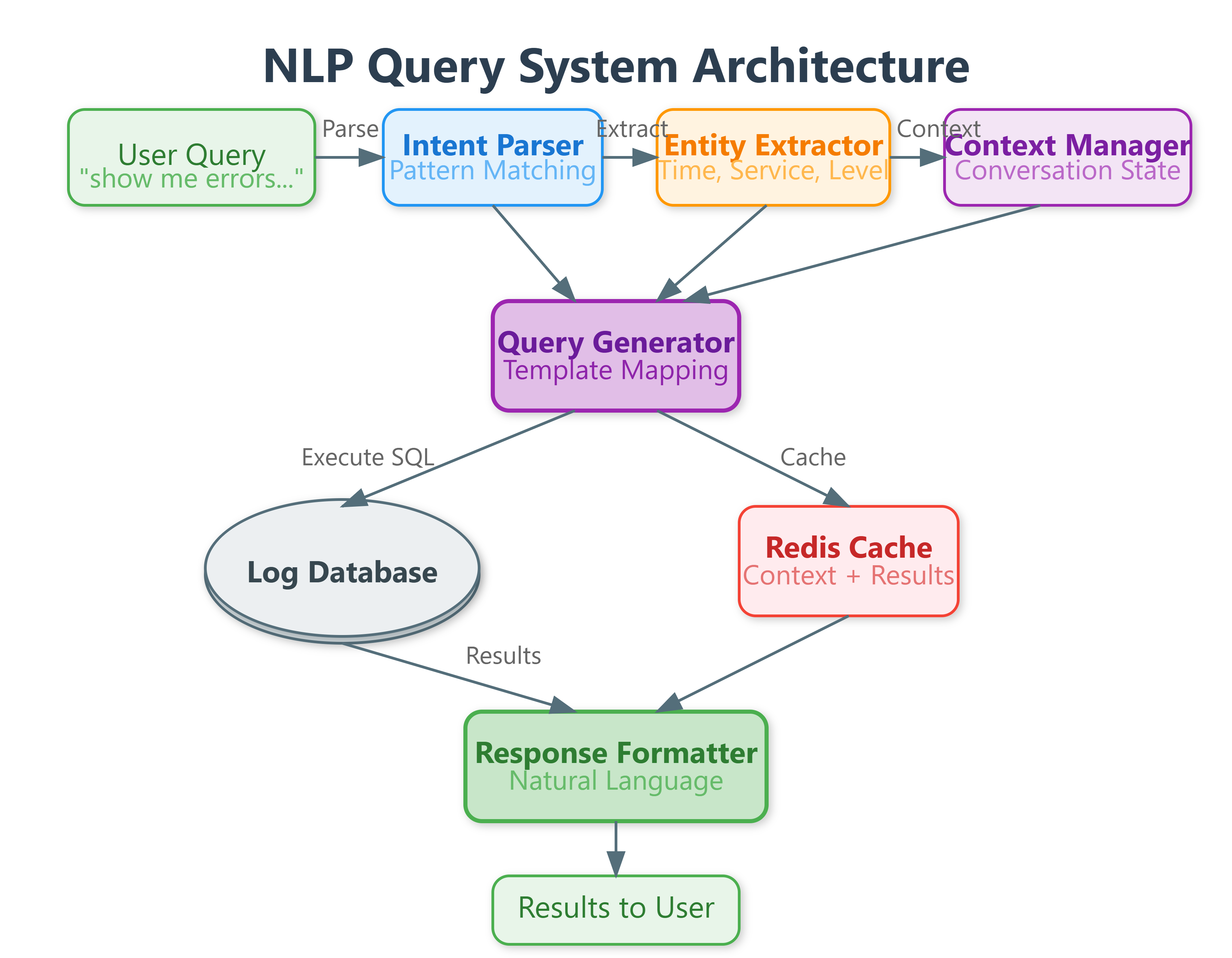
Our NLP query system consists of five core components working together. The Intent Parser analyzes user questions to extract query intent—whether they’re looking for counts, specific logs, time ranges, or patterns. The Entity Extractor identifies key elements like service names, time periods, log levels, and field values mentioned in natural language.
The Query Generator translates parsed intent and entities into executable database queries, handling the complexity of SQL generation, index optimization, and query structure. The Context Manager maintains conversation history, enabling follow-up questions like “show me more” or “what about yesterday?” without requiring complete context repetition.
Finally, the Response Formatter converts raw query results into natural language responses with proper context, making results immediately understandable without technical interpretation.
