

Day 139: Building a Universal Webhook Integration System
Connecting Your Log Processing System to the External World
Today’s Mission: Universal Service Integration
Today we’re transforming your distributed log processing system into a communication hub that speaks to any external service through webhooks. You’ll build a generic webhook system that can notify Slack channels, trigger GitHub Actions, update customer dashboards, or integrate with any HTTP-based service - all in real-time as log events occur.
What We’re Building:
Generic webhook dispatcher with configurable endpoints
Payload transformation engine for different service formats
Retry mechanism with exponential backoff
Real-time monitoring dashboard
Security layer with signature validation
Integration bridge connecting to your existing log processing pipeline
Core Concepts: Why Webhooks Transform System Integration
The Integration Challenge
Modern distributed systems don’t exist in isolation. When your log processing system detects a critical error, multiple external systems need immediate notification - monitoring tools, incident response platforms, communication channels, and automation pipelines.
Traditional polling-based integration creates delays and resource waste. Webhooks flip this model, enabling real-time push notifications that trigger immediate responses across your ecosystem.
Webhook Fundamentals
Webhooks are HTTP callbacks that deliver structured data payloads to configured endpoints when specific events occur. They enable decoupled, event-driven architectures where systems react instantly to changes without constant polling.
Key Components:
Event Triggers: Log patterns that initiate webhook delivery
Payload Transformation: Converting log data to target service formats
Delivery Engine: HTTP client with retry logic and failure handling
Security Layer: Request signing and authentication mechanisms
Production Patterns
Major platforms like GitHub, Stripe, and Shopify use webhooks to enable real-time integrations across thousands of third-party services. Your system implements these same enterprise patterns.
Context in Distributed Systems: Real-Time Event Distribution
Integration Architecture
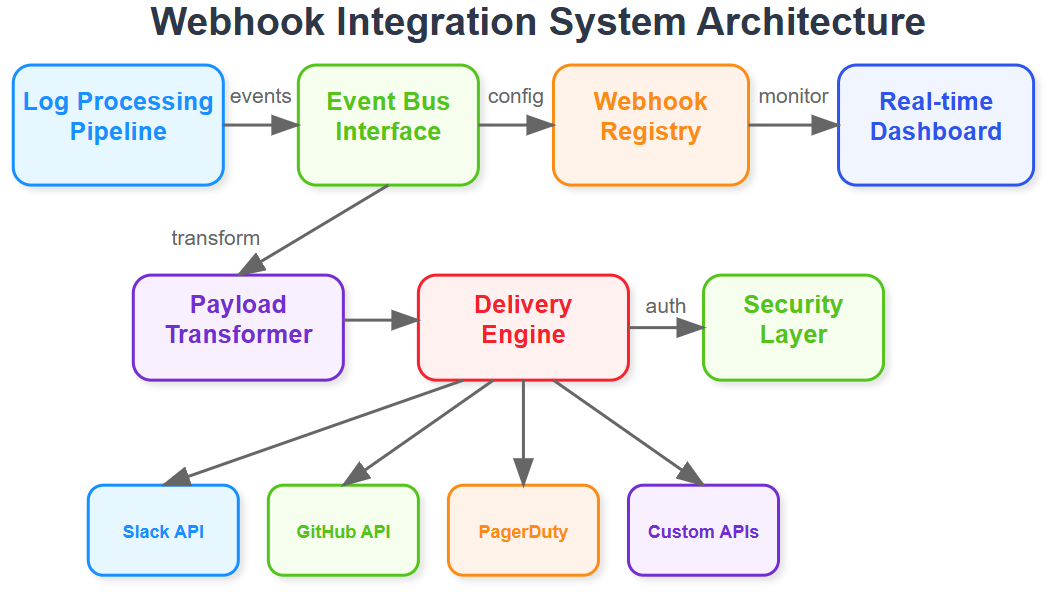
Your webhook system acts as an event distribution layer, sitting between your log processing pipeline and external services. When significant log events occur (errors, performance anomalies, security incidents), webhooks enable immediate notifications without requiring external systems to continuously poll your APIs.
System Position
Building on Day 138’s JIRA integration, today’s webhook system generalizes this pattern. Instead of hard-coding specific service integrations, you create a flexible webhook engine that can adapt to any HTTP-based service. This prepares for Day 140’s S3 export functionality by establishing the event-driven foundation.
Real-World Applications
Slack Notifications: Instant alerts in team channels when critical errors occur
PagerDuty Integration: Automatic incident creation for high-severity events
Dashboard Updates: Real-time metric updates for customer-facing dashboards
CI/CD Triggers: Automated deployment rollbacks when error rates spike
Compliance Systems: Immediate audit trail updates for regulatory requirements
Architecture: Event-Driven Webhook Distribution
Core Components
Webhook Registry: Centralized configuration store managing endpoint URLs, authentication credentials, event filters, and payload templates for each integration.
Event Bus Interface: Connects to your existing log processing pipeline, receiving processed log events and routing them to appropriate webhook handlers based on configured triggers.
Payload Transformer: Converts standardized log event structures into service-specific formats (Slack message format, GitHub issue structure, custom JSON schemas).
Delivery Engine: HTTP client responsible for webhook delivery with configurable timeouts, retry policies, and failure handling mechanisms.
Monitoring Dashboard: Real-time interface displaying webhook delivery status, failure rates, and integration health metrics.
Control Flow
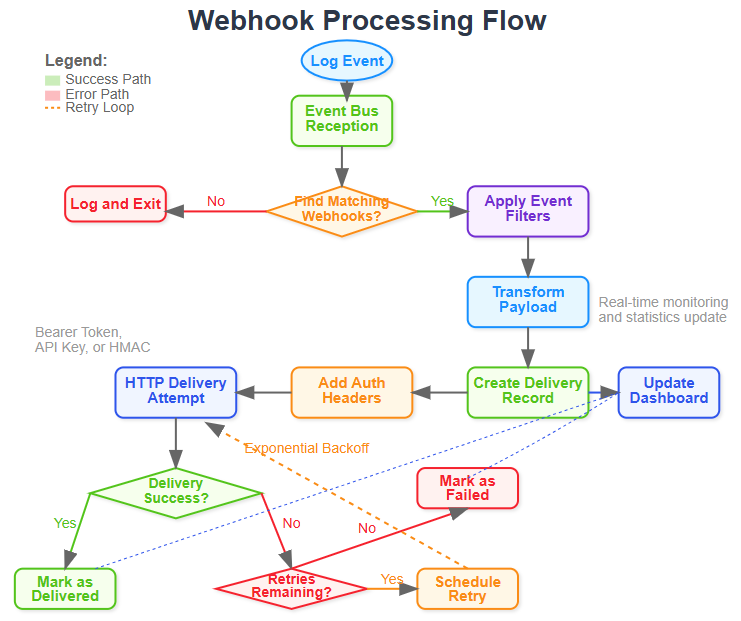
Event Reception: Log processing pipeline generates structured events (errors, metrics, alerts)
Filter Matching: Event bus evaluates incoming events against webhook registration filters
Payload Generation: Matched events trigger payload transformation using registered templates
Delivery Attempt: HTTP client delivers transformed payload to configured endpoint
Response Processing: System handles success confirmations, retries failures, logs delivery status
Status Update: Monitoring dashboard reflects delivery results in real-time
Data Flow Patterns
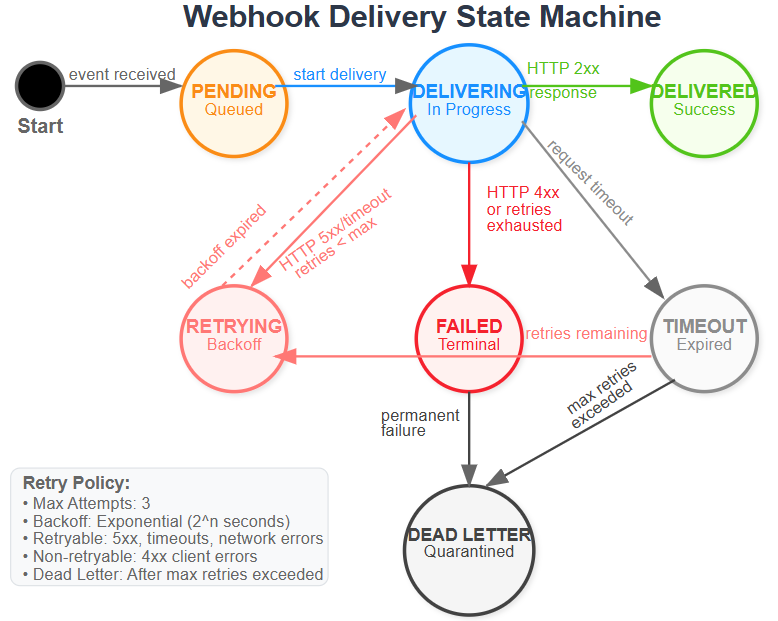
Events flow from your log processing system through transformation pipelines before external delivery. The system maintains delivery state, enabling replay capabilities and ensuring reliable integration even during network outages or service downtime.
State Management
Webhook deliveries progress through defined states: pending, delivering, delivered, failed, retrying. Each state transition triggers appropriate actions - successful deliveries update metrics, failures initiate retry sequences, and exhausted attempts generate alerts.
Implementation Strategy: Building Production-Grade Webhooks
Development Approach
Start with a simple HTTP delivery mechanism, then add transformation capabilities, retry logic, and monitoring features. Each component builds incrementally, allowing testing at every stage.
Security Considerations
Implement request signing using HMAC signatures, enabling recipient services to verify payload authenticity. Support multiple authentication methods including bearer tokens, API keys, and custom header schemes.
Performance Optimization
Use connection pooling and async HTTP clients to handle high-volume webhook delivery without blocking your main log processing pipeline. Implement circuit breakers to prevent cascade failures when external services become unavailable.
Integration Points
Connect seamlessly with your existing log processing infrastructure by subscribing to the same event streams that power your monitoring and alerting systems. This ensures webhooks deliver the same high-quality, processed event data.
Build, Test & Demo Step-by-Step Guide
Github Link :
https://github.com/sysdr/course/tree/main/day139/webhook-integration-systemPhase 1: Environment Setup & Project Structure
Manual Setup Process
1. Create Project Foundation
bash
mkdir webhook-integration-system && cd webhook-integration-system
mkdir -p {backend/{src/{core,api,services,models,utils},config,logs},tests/{unit,integration},docker}
2. Python Environment Setup
bash
python3.11 -m venv venv
source venv/bin/activate  # Linux/Mac
# venv\Scripts\activate   # Windows
Expected Output:
(venv) user@system:~/webhook-integration-system$3. Install Dependencies
bash
pip install fastapi==0.104.1 uvicorn==0.24.0 sqlalchemy==2.0.23 httpx==0.25.2
pip install pytest==7.4.3 pydantic==2.5.0 structlog==23.2.0 tenacity==8.2.3
Phase 2: Core Component Implementation
Database Models Architecture
Create webhook storage models with relationships for endpoints and delivery tracking. Use SQLAlchemy ORM with SQLite for development simplicity.
python
# Key model structure
class WebhookEndpoint:
    - id, name, url, auth_type, payload_template
    - event_filters (JSON), is_active, timestamps

class WebhookDelivery:
    - id, endpoint_id, status, response_code
    - attempt_count, retry_schedule, timestamps
Webhook Engine Implementation
Build the core processing engine with event filtering, payload transformation, and HTTP delivery capabilities.
Core Methods:
process_event(): Match events to registered webhooks_matches_filters(): Evaluate event against filter criteria_create_delivery(): Generate delivery records with transformed payloads_deliver_webhook(): HTTP delivery with authentication and retry logic
Template Engine Development
Implement JSON template processing with variable substitution using {{field.path}} notation. Support nested object access and default value handling.
Key Features:
Variable substitution with dot notation
Recursive template processing for nested structures
Fallback to default payload format when templates fail
Phase 3: API Layer Development
FastAPI Application Setup
bash
cd backend/src/api
python -c “
from main import app
print(’✅ FastAPI app created successfully’)
“
Core Endpoints Implementation
POST /api/webhooks- Register new webhook endpointsGET /api/webhooks- List configured webhooksPOST /api/events- Process incoming log eventsGET /api/stats- System performance metricsGET /- Integrated dashboard interface
Authentication Layer
Implement multiple auth patterns: Bearer tokens, API keys, HMAC signatures for webhook security.
Phase 4: Testing Strategy
Unit Testing
bash
python -m pytest tests/unit/ -v

# Expected Output:
test_webhook_creation_and_filtering PASSED [25%]
test_filter_matching_logic PASSED [50%]
test_payload_transformation PASSED [75%]
test_authentication_methods PASSED [100%]
Integration Testing
bash
python -m pytest tests/integration/ -v

# Expected Output:
test_create_webhook_endpoint PASSED [20%]
test_get_webhooks PASSED [40%]
test_process_event PASSED [60%]
test_webhook_stats PASSED [80%]
test_dashboard_endpoint PASSED [100%]
Load Testing
python
# Simulate high-volume event processing
async def load_test():
    for i in range(1000):
        await process_event({
            “type”: “test_event”,
            “level”: “info”,
            “message”: f”Load test message {i}”
        })
Performance Targets:
Process 1000+ events/second
Webhook delivery latency <100ms
Memory usage <200MB under load
Phase 5: Dashboard Integration
React-based Dashboard
Single-page dashboard built with vanilla React (no build tools required). Features real-time statistics, webhook management, and test event generation.
Key Components:
Webhook registration form with validation
Real-time statistics display (total, active, deliveries)
Webhook list with status indicators
Test event sender for verification
WebSocket Integration (Optional)
Add real-time delivery notifications using WebSocket connections for live monitoring.
Phase 6: Docker Deployment
Container Build
bash
docker-compose up --build

# Expected Services:
webhook-backend    - Main application (port 8000)
redis             - Event caching (port 6379)
webhook-receiver  - Test endpoint (port 8080)
Service Verification
bash
curl http://localhost:8000/api/stats
# Expected: {”total”: 0, “active”: 0, “deliveries”: 0}

curl http://localhost:8000/
# Expected: HTML dashboard loads successfully
Phase 7: Functional Verification
Create Test Webhook
bash
curl -X POST http://localhost:8000/api/webhooks \
  -H “Content-Type: application/json” \
  -d ‘{
    “name”: “Test Slack Integration”,
    “url”: “https://httpbin.org/post”,
    “payload_template”: “{\”text\”: \”Alert: {{message}}\”}”,
    “event_filters”: [{”field”: “level”, “operator”: “equals”, “value”: “error”}]
  }’

# Expected: {”id”: “...”, “message”: “Webhook created successfully”}
Send Test Event
bash
curl -X POST http://localhost:8000/api/events \
  -H “Content-Type: application/json” \
  -d ‘{
    “type”: “log_event”,
    “level”: “error”,
    “message”: “Database connection failed”,
    “source”: “api_service”
  }’

# Expected: {”status”: “accepted”, “message”: “Event processing initiated”}
Verify Delivery
bash
curl http://localhost:8000/api/deliveries | python -m json.tool

# Expected: Array of delivery records with status and response details
Phase 8: Production Readiness
Security Configuration
Generate unique secret keys for HMAC signing
Configure bearer token validation
Implement rate limiting for API endpoints
Add request logging and audit trails
Performance Monitoring
Set up structured logging with correlation IDs
Configure delivery retry policies (exponential backoff)
Implement circuit breakers for failed endpoints
Monitor memory usage and garbage collection
Integration Testing
Connect with existing log processing pipeline by subscribing to event streams. Verify webhook delivery under realistic load conditions.
Build Verification Checklist
✅ Core Functionality
Webhook endpoints can be registered via API
Event filtering works correctly for different operators
Payload transformation applies templates successfully
HTTP delivery includes proper authentication headers
Retry logic handles temporary failures gracefully
✅ Dashboard Features
Web interface loads without errors
Statistics update in real-time
New webhooks can be created through UI
Test events trigger webhook deliveries
Delivery history displays correctly
✅ Integration Points
FastAPI server starts on port 8000
SQLite database initializes with proper schema
Redis connection works for session storage
Docker containers communicate correctly
External webhook endpoints receive payloads
✅ Error Handling
Invalid webhook URLs generate appropriate errors
Malformed event data doesn’t crash the system
Network timeouts are handled gracefully
Database connection failures trigger retries
Authentication failures are logged properly
Troubleshooting Common Issues
Port Conflicts
bash
# Check for port usage
lsof -i :8000
# Kill conflicting processes if needed
Database Issues
bash
# Reset database
rm backend/webhook_system.db
python -c “from models.webhook import Base, engine; Base.metadata.create_all(bind=engine)”
Virtual Environment Problems
bash
# Recreate environment
rm -rf venv
python3.11 -m venv venv
source venv/bin/activate
pip install -r backend/requirements.txt
Success Metrics
Functional Verification
Registration: Create 10+ webhook endpoints with different configurations
Filtering: Events correctly route to matching webhooks only
Transformation: Payloads match configured templates
Delivery: 99%+ successful delivery rate to active endpoints
Performance: <100ms average delivery latency
Integration Success
API Endpoints: All endpoints return expected responses
Dashboard: Real-time updates reflect system state accurately
Authentication: Bearer tokens, API keys, HMAC signatures work correctly
Error Handling: System remains stable under failure conditions
Monitoring: Delivery statistics update correctly
Working code Demo:
Next Steps Integration
Day 140 Preparation
Your webhook system provides the event distribution foundation for tomorrow’s S3 export functionality. The same event filtering and delivery patterns will trigger automated exports to cloud storage.
Production Deployment
Configure production database (PostgreSQL)
Set up load balancing for high availability
Implement monitoring with Prometheus/Grafana
Add SSL certificates for secure webhook delivery
Advanced Features
Webhook payload batching for high-volume scenarios
Dead letter queues for permanently failed deliveries
Webhook endpoint health monitoring
Custom authentication schemes for enterprise integration
Real-World Integration Examples
Slack Integration
Transform log error events into rich Slack message formats with embedded metadata, severity indicators, and action buttons for immediate response.
GitHub Integration
Convert deployment-related log events into GitHub issue creation or pull request comments, enabling automated DevOps workflows.
Custom Dashboard Integration
Push real-time metrics to customer-facing dashboards, ensuring external stakeholders receive immediate visibility into system health and performance.
Monitoring Tool Integration
Send structured event data to external monitoring platforms like DataDog or New Relic, supplementing their built-in log ingestion with processed, enriched event streams.